ComfyUI-QwenVLは、Alibaba CloudのQwen-VLシリーズ(Qwen3-VLやQwen2.5-VL)をComfyUIで動かせるカスタムノードです。
画像や動画を渡すと、その中身を読み取って文章で説明してくれます。
画像のキャプション作成や、生成用のプロンプト作りなどに便利です。
ComfyUI-QwenVLとは?
ComfyUI上でQwen-VL系のビジョン言語モデルを使うためのノードです。
画像や動画(フレーム連番)を入力すると、その内容を読み取ってテキストとして出力します。
モデルは初回使用時にHugging Faceから自動でダウンロードされるので、事前準備はほとんど要りません。
VRAMに合わせて4bit/8bit/FP16の量子化を選べるので、軽めのGPUでも動かしやすいです。
Qwen3-VL、Qwen2.5-VLに加えて、GGUF版やテキスト専用のプロンプト強化ノードも入っています。
主な特徴
- 標準ノードと、生成を細かく調整できるAdvancedノードの2種類
- 画像と動画(連番フレーム)の両方を入力できる
- モデルは初回に自動ダウンロード、量子化でVRAMを節約できる
- プリセットプロンプトと自由入力のカスタムプロンプトに対応
- プロンプト生成用のEnhancerノードや、GGUF版ノードも同梱

ComfyUIでComfyUI-QwenVLを使う方法
ComfyUI-QwenVLのインストール
ComfyUI-Managerからインストールする場合は、ComfyUI-Manager→Custom Nodes Manager→検索でComfyUI-QwenVLからインストールできます。
手動インストールする場合は、custom_nodesでクローンしてください。
cd ComfyUI\custom_nodes
git clone https://github.com/1038lab/ComfyUI-QwenVL.git
インストールが終わったらComfyUIを再起動してください。
モデルの用意
モデルは初回実行時に自動でダウンロードされるので、基本はそのままで大丈夫です。
手動で置きたい場合は、ダウンロードしたモデルを下のフォルダに入れてください。
ComfyUI/models/LLM/Qwen-VL/軽く試すなら2B〜4B、もう少し精度が欲しいなら8B以上、という感じで使い分けると良いと思います。
主なモデルのダウンロード先はこちら。
- Qwen3-VL-4B-Instruct:https://huggingface.co/Qwen/Qwen3-VL-4B-Instruct
- Qwen3-VL-8B-Instruct:https://huggingface.co/Qwen/Qwen3-VL-8B-Instruct
- Qwen2.5-VL-7B-Instruct:https://huggingface.co/Qwen/Qwen2.5-VL-7B-Instruct
GGUF版のノードを使う場合は、別途llama-cpp-pythonのインストールが必要です。
インストール方法については別途ドキュメントがあるのでこちらを参照してください。
ノードの設定&実行
以下にサンプルワークフローがあるので、ComfyUIにD&Dすれば使えます。
足りないノードがあった場合はComfyUI-Manager→Missing Nodesでインストールしてください。
ComfyUI-QwenVL\example_workflowsQWenVL.jsonが画像/動画を解析できるものなのでこちらを使っていきます。
基本は画像と動画をセットして実行するだけです。
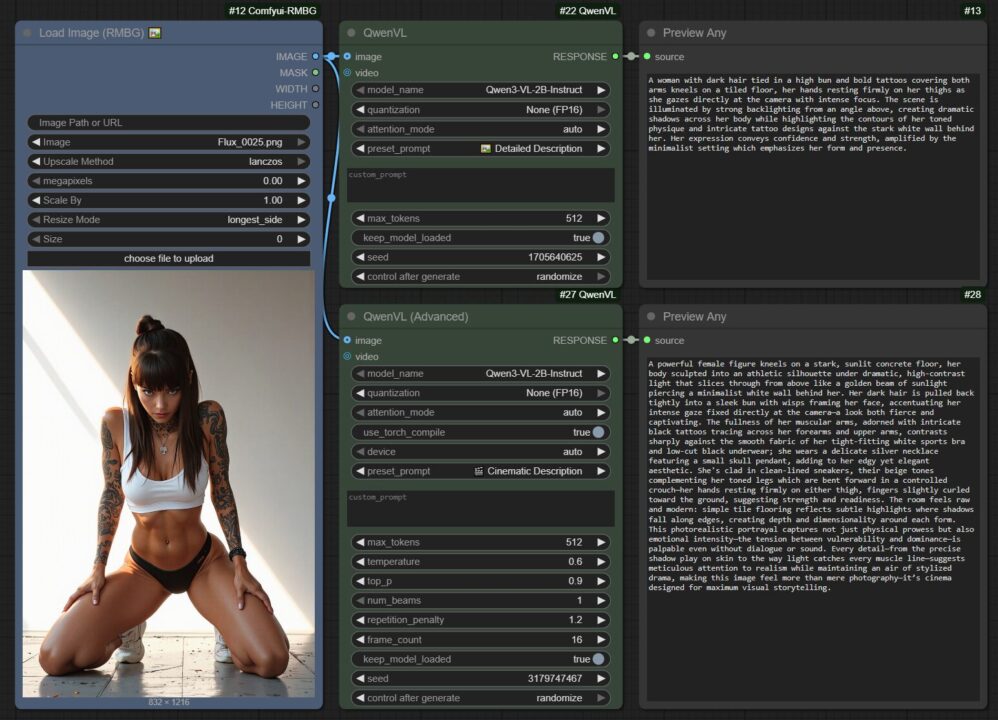
画像の場合は、Load Image (RMBG) に画像をセットします。
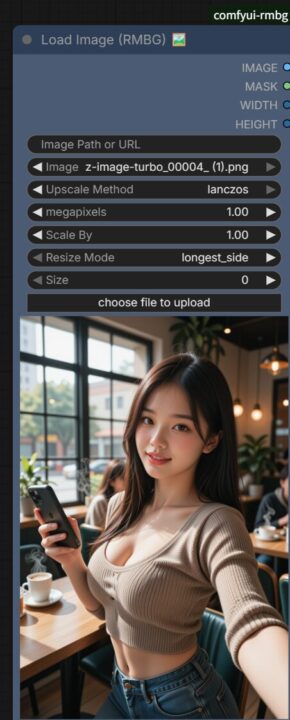
QwenVLで以下のパラメータを設定できます。
基本は使用モデルを選ぶだけでも問題ありません。
- model_name:使うモデルを選択。
- quantization:VRAMの節約具合。数字が小さいほど軽い。
- preset_prompt:あらかじめ用意された質問(プリセット)。
- custom_prompt:画像に対して聞きたいことを自由に書く。
- seed:結果を再現するための値。
- keep model loaded:モデルをVRAMに残しておく設定。オンにすると、続けて実行するときに読み込み直しが減って速くなる
実行するとこんな感じで結果がでます。
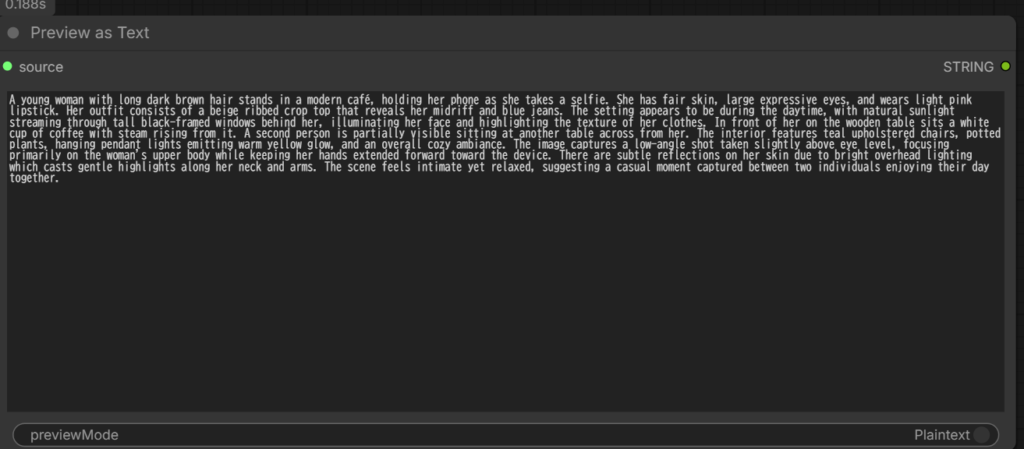
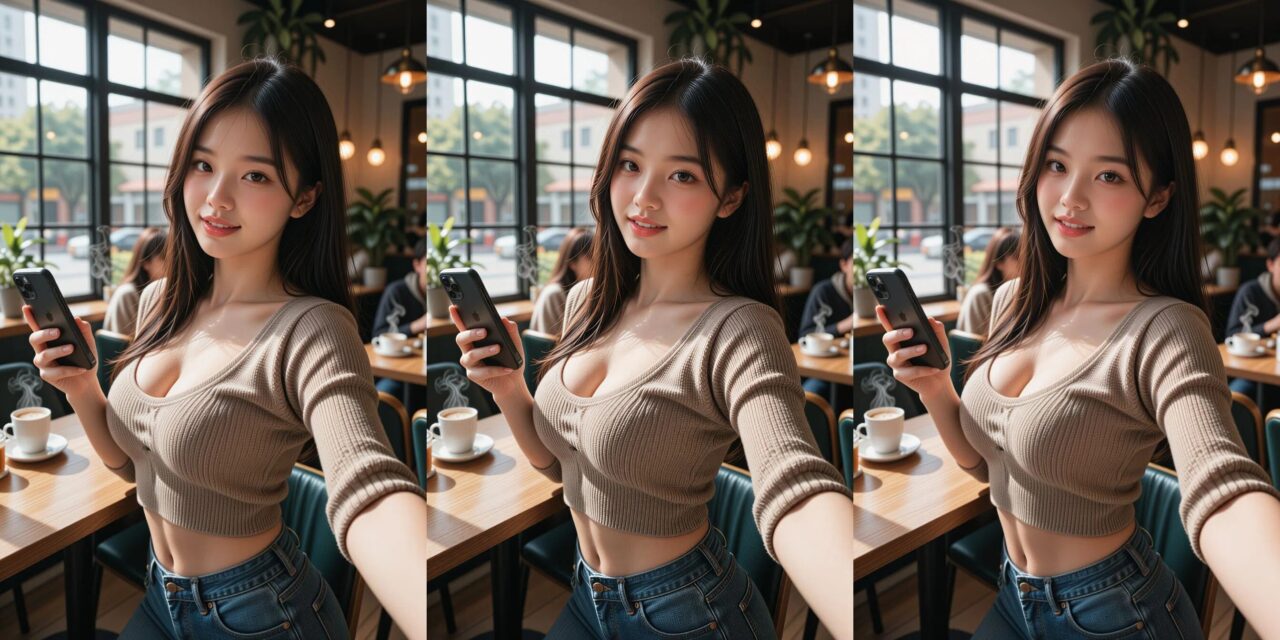
A young woman with long dark brown hair stands in a modern café, holding her phone as she takes a selfie. She has fair skin, large expressive eyes, and wears light pink lipstick. Her outfit consists of a beige ribbed crop top that reveals her midriff and blue jeans. The setting appears to be during the daytime, with natural sunlight streaming through tall black-framed windows behind her, illuminating her face and highlighting the texture of her clothes. In front of her on the wooden table sits a white cup of coffee with steam rising from it. A second person is partially visible sitting at another table across from her. The interior features teal upholstered chairs, potted plants, hanging pendant lights emitting warm yellow glow, and an overall cozy ambiance. The image captures a low-angle shot taken slightly above eye level, focusing primarily on the woman’s upper body while keeping her hands extended forward toward the device. There are subtle reflections on her skin due to bright overhead lighting which casts gentle highlights along her neck and arms. The scene feels intimate yet relaxed, suggesting a casual moment captured between two individuals enjoying their day together.
動画は全フレームを見るのではなく、動画全体から等間隔で数フレーム(標準16枚、Advancedは1〜64枚で調整)を抜き出して解析するみたいです。
長い動画や細かい動きを追いたいときは、Advanced で frame_count を増やせば調整できます。
ただその分処理が遅くなります。
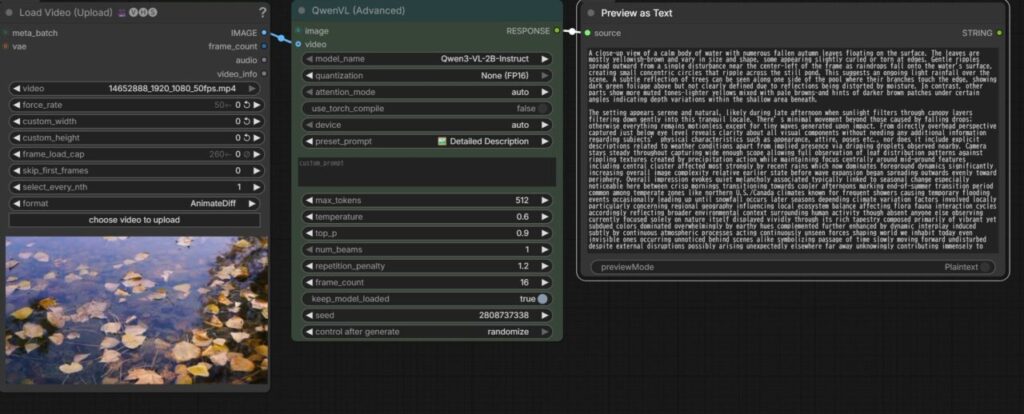
お借りした動画:https://www.pexels.com/ja-jp/video/34579859/
A close-up view of a calm body of water with numerous fallen autumn leaves floating on the surface. The leaves are mostly yellowish-brown and vary in size and shape, some appearing slightly curled or torn at edges. Gentle ripples spread outward from a single disturbance near the center-left of the frame as raindrops fall onto the water’s surface, creating small concentric circles that ripple across the still pond. This suggests an ongoing light rainfall over the scene. A subtle reflection of trees can be seen along one side of the pool where their branches touch the edge, showing dark green foliage above but not clearly defined due to reflections being distorted by moisture. In contrast, other parts show more muted tones—lighter yellows mixed with pale browns—and hints of darker brown patches under certain angles indicating depth variations within the shallow area beneath.
The setting appears serene and natural, likely during late afternoon when sunlight filters through canopy layers filtering down gently into this tranquil locale. There’s minimal movement beyond those caused by falling drops; otherwise everything remains motionless except for tiny waves generated upon impact. From directly overhead perspective captured just below eye level reveals clarity about all visual components without needing any additional information regarding subjects’ physical characteristics such as appearance, attire, poses etc., nor does it include explicit descriptions related to weather conditions apart from implied presence via dripping droplets observed nearby. Camera stays steady throughout capturing wide enough scope allowing full observation of leaf distribution patterns against rippling textures created by precipitation action while maintaining focus centrally around mid-ground features including central cluster affected most strongly by recent rains which now dominates foreground dynamics significantly increasing overall image complexity relative earlier state before wave expansion began spreading outwards evenly toward periphery. Overall impression evokes quiet melancholy associated typically linked to seasonal change especially noticeable here between crisp mornings transitioning towards cooler afternoons marking end-of-summer transition period common among temperate zones like northern U.S./Canada climates known for frequent showers causing temporary flooding events occasionally leading up until snowfall occurs later seasons depending climate variation factors involved locally particularly concerning regional geography influencing local ecosystem balance affecting flora fauna interaction cycles accordingly reflecting broader environmental context surrounding human activity though absent anyone else observing currently focused solely on nature itself displayed vividly through its rich tapestry composed primarily of vibrant yet subdued colors dominated overwhelmingly by earthy hues complemented further enhanced by dynamic interplay induced subtly by continuous atmospheric processes acting continuously unseen forces shaping world we inhabit today even invisible ones occurring unnoticed behind scenes alike symbolizing passage of time slowly moving forward undisturbed despite external disruptions possibly arising unexpectedly elsewhere far away unknowingly contributing immensely to
まとめ
今回は画像/動画の解析だけですが、これをPromptとして使う画像生成のworkflowに入れたり、フォルダ内の画像をバッチ処理してキャプション作ったりといった応用ができると思います
実際にやることがあればそれは別途紹介します。
以上QwenVLの使い方を紹介しました。
参考になれば幸いです。