MiniMax H3のオープンウェイト版が公開され、ComfyUIから映像とステレオ音声をまとめてローカル生成できるようになりました。
今回は公式ワークフローを使い、音声付き動画を生成する方法を紹介します。
MiniMax H3とは?
MiniMax H3は、テキスト・画像・動画・音声を扱えるMiniMaxの動画生成モデルです。
映像だけでなく、セリフ・効果音・音楽を含むステレオ音声も一緒に生成できるのが特徴。
ComfyUIでは、テキストから動画を作るT2V、画像を動かすI2V、画像・動画・音声を参照するR2Vの公式ワークフローが用意されています。
主な特徴
- 映像とステレオ音声を1本のMP4として生成
- テキスト、画像、動画、音声を組み合わせた生成に対応
- ComfyUIの標準ノードでローカル実行可能
- 24fps、約15秒までの動画生成に対応


MiniMax H3のライセンスと商用利用
MiniMax H3には、独自の「MiniMax H3 Community License Agreement」が適用されます。
2026年8月3日時点では、日本はライセンスの対象地域に含まれており、生成した出力物についてMiniMaxは権利を主張しないとのこと。
ただし、商用サービスで利用する場合はUIへ「MiniMax H3」と表示するなどの条件があり、年間売上が2,000万米ドルを超える製品やサービスでは事前の書面承認が必要です。
地域制限や利用禁止事項もあるため、商用利用前には必ず最新のライセンスを確認してください。
MiniMax H3を動かすために必要なもの
ComfyUI 0.30.0以降で対応しているため、ComfyUIを最新版へ更新してください。
モデルは最低限動かすための4ファイル(T2V/I2V/R2V)がそれぞれで約40GB、全部DLすると約59GB、LoRAやembeddingまで含めるともう数GBくらい増えます。
ComfyUIをまだ導入していない場合は、以下の記事を参考にしてみてください。

モデルをダウンロードして配置する
T2VとI2Vは同じFL2VAモデルを使い、R2Vだけ別のREF2VAモデルが必要です。
Text Encoderと2種類のVAEは、3つのワークフローで共通になります。
| 種類 | ファイル | 配置先 | 容量 |
|---|---|---|---|
| Text Encoder | qwen3vl_32b_minimax_h3_nvfp4_awq.safetensors | ComfyUI/models/text_encoders | 約14.6GB |
| Video VAE | minimax_h3_video_vae_fp16.safetensors | ComfyUI/models/vae | 約4.9GB |
| Audio VAE | minimax_h3_audio_vae_fp32.safetensors | ComfyUI/models/vae | 約0.6GB |
T2V・I2VではFL2VAモデルを使います。
| ファイル | 配置先 | 容量 |
|---|---|---|
| minimax_h3_fl2va_pruned_int8_convrot.safetensors | ComfyUI/models/diffusion_models | 約19.5GB |
R2Vでは、REF2VAモデルが必要です。
| ファイル | 配置先 | 容量 |
|---|---|---|
| minimax_h3_ref2va_pruned_int8_convrot.safetensors | ComfyUI/models/diffusion_models | 約19.5GB |
その他高速化や特定の演出を再現できるembeddingも配布されています。
これらは任意なので使わなくても生成は可能です。
T2V・I2V用は8stepと4step、R2V用は4stepが用意されています。
| 種類 | ファイル | 配置先 | 容量 |
|---|---|---|---|
| T2V・I2V用(8step) | minimax_h3_fl2v_turbo_8step_v1.0_comfyui_bf16.safetensors | ComfyUI/models/loras | 約1.8GB |
| T2V・I2V用(4step・768p) | minimax_h3_fl2v_turbo_4step_v1.0_768p_comfyui_bf16.safetensors | ComfyUI/models/loras | 約1.8GB |
| R2V用(4step) | minimax_h3_ref2v_turbo_4step_v0.1_comfyui_bf16.safetensors | ComfyUI/models/loras | 約1.8GB |
embeddingはファイル名がそのままトリガーで、プロンプトへ embedding:ファイル名 の形で書くとその演出を再現できるものです。
| 効果 | ファイル | 配置先 | 容量 |
|---|---|---|---|
| 爆発するアートの表現 | minimaxh3_art_is_explosion.safetensors | ComfyUI/models/embeddings | 約0.5MB |
| 花が咲く | minimaxh3_blooming_flowers.safetensors | ComfyUI/models/embeddings | 約1.2MB |
| バレットタイム | minimaxh3_bullet_time.safetensors | ComfyUI/models/embeddings | 約0.9MB |
| 闇の魔法の雰囲気 | minimaxh3_dark_magic.safetensors | ComfyUI/models/embeddings | 約0.6MB |
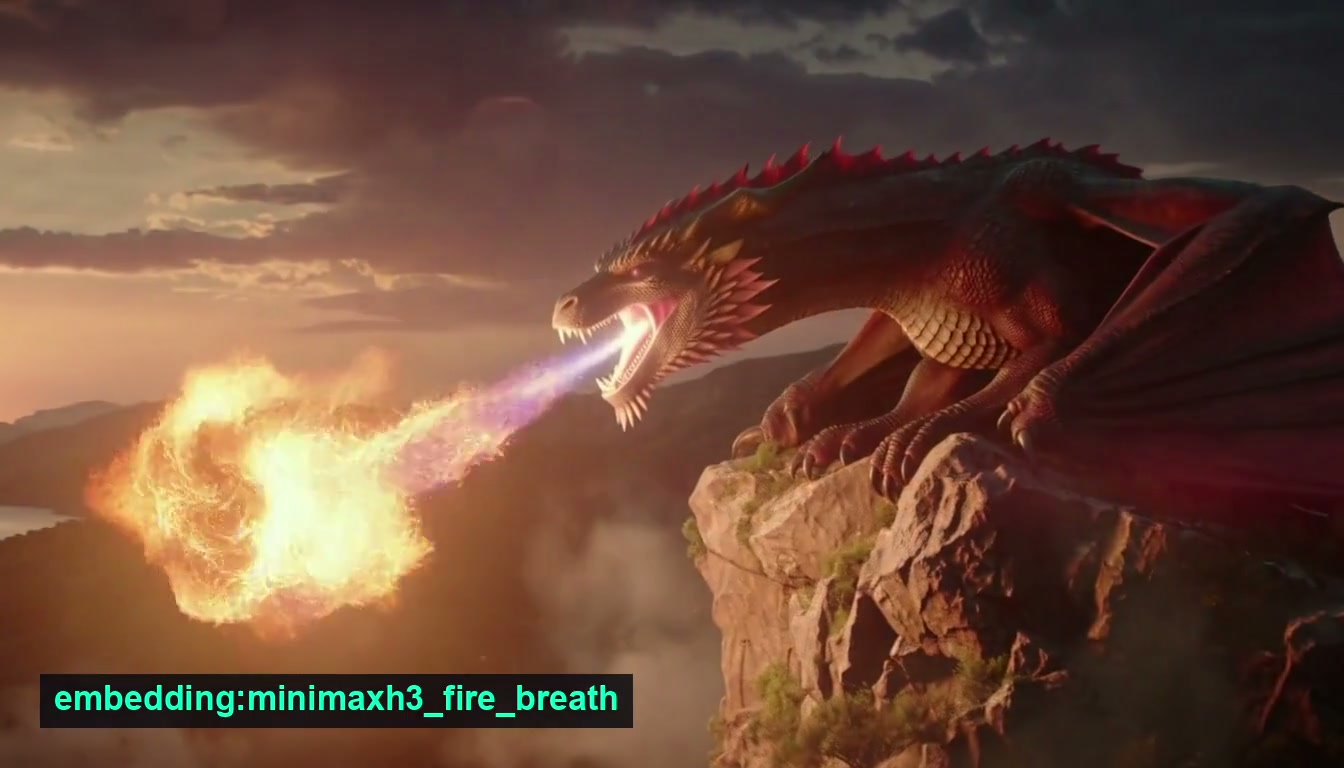
| 火を吐く | minimaxh3_fire_breath.safetensors | ComfyUI/models/embeddings | 約1.2MB |
| 四季の移り変わり | minimaxh3_four_seasons.safetensors | ComfyUI/models/embeddings | 約1.4MB |
| キスシーンのカメラワーク | minimaxh3_kiss_camera.safetensors | ComfyUI/models/embeddings | 約0.9MB |
| らせん状に上昇 | minimaxh3_spiral_ascent.safetensors | ComfyUI/models/embeddings | 約1.3MB |
| 嵐の魔法 | minimaxh3_storm_magic.safetensors | ComfyUI/models/embeddings | 約1.3MB |
| トゥルーマン・ショー風 | minimaxh3_truman_show.safetensors | ComfyUI/models/embeddings | 約0.9MB |
全て配置した場合、フォルダ構成は以下のようになります。
ComfyUI/
└─ models/
   ├─ diffusion_models/
   │  ├─ minimax_h3_fl2va_pruned_int8_convrot.safetensors
   │  └─ minimax_h3_ref2va_pruned_int8_convrot.safetensors
   ├─ embeddings/
   │  ├─ minimaxh3_art_is_explosion.safetensors
   │  ├─ minimaxh3_blooming_flowers.safetensors
   │  ├─ minimaxh3_bullet_time.safetensors
   │  ├─ minimaxh3_dark_magic.safetensors
   │  ├─ minimaxh3_fire_breath.safetensors
   │  ├─ minimaxh3_four_seasons.safetensors
   │  ├─ minimaxh3_kiss_camera.safetensors
   │  ├─ minimaxh3_spiral_ascent.safetensors
   │  ├─ minimaxh3_storm_magic.safetensors
   │  └─ minimaxh3_truman_show.safetensors
   ├─ loras/
   │  ├─ minimax_h3_fl2v_turbo_8step_v1.0_comfyui_bf16.safetensors
   │  ├─ minimax_h3_fl2v_turbo_4step_v1.0_768p_comfyui_bf16.safetensors
   │  └─ minimax_h3_ref2v_turbo_4step_v0.1_comfyui_bf16.safetensors
   ├─ text_encoders/
   │  └─ qwen3vl_32b_minimax_h3_nvfp4_awq.safetensors
   └─ vae/
      ├─ minimax_h3_video_vae_fp16.safetensors
      └─ minimax_h3_audio_vae_fp32.safetensors
必要なファイルを配置したらComfyUIを再起動してください。
各ローダーにファイル名が表示され、赤いエラーが出なければモデルの準備は完了です。
公式ワークフローを読み込む
ComfyUIを開き、左上部のメニューから「Browse Templates」を開いて、ワークフローを取り込めます。
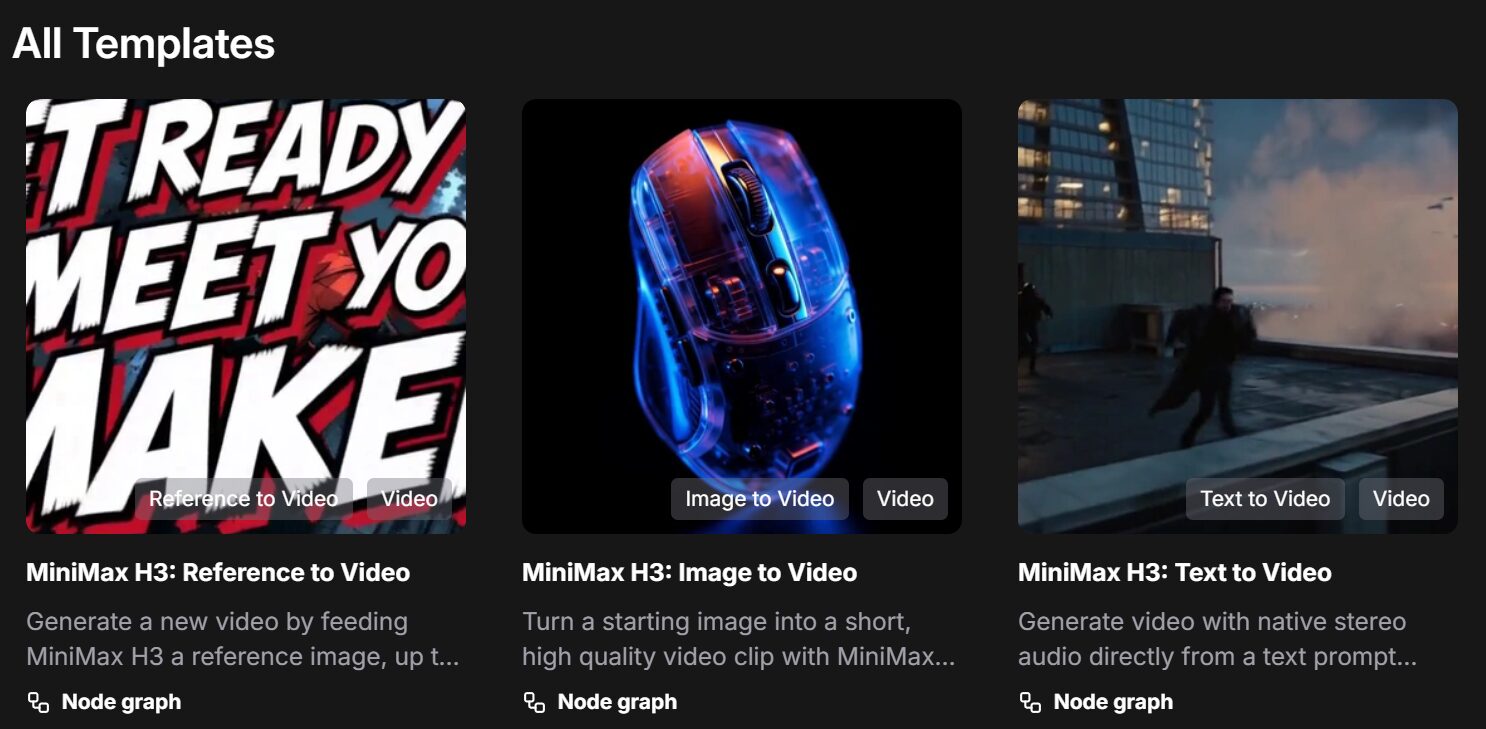
- MiniMax H3 Text 2 Video:テキストから動画を生成
- MiniMax H3 Image 2 Video:入力画像から動画を生成
- MiniMax H3 Reference 2 Video:画像・動画・音声を参照して動画を生成
MiniMax H3のプロンプトの書き方
公式ガイドでは、映像・音・BGMを次の3項目に分けて書いています。
integrated_multimodal_description:
[Shot 1]
被写体、動き、背景、カメラワーク、台詞、効果音

overall_soundscape:
環境音や動作音

non_diegetic_music:
BGM
映像部分は時間順に書き、2カット目以降は開始時刻を指定。
- T2V:
[Shot 1]から、被写体の状態→動き→結果の順で書きます。 - I2V:
<Picture 1>を0秒の先頭フレームとして、画像の状態からどのように動くかを書きます。 - R2V:接続順に対応する
<Picture N>、<Video N>、<Audio N>を使い、各素材から何を参照するかを書きます。
<Picture 1>の[人物・構図など]を保持し、
<Video 1>の[動き・カメラワークなど]を参照する。カメラはTracking ShotやPush Inのように動きを指定し、台詞は(S1) <d>[Japanese] セリフ</d>の形式でした。
プロンプト本文は英語が基本ですが、台詞・歌詞・画面内の文字は出力したい言語で書きます。
全部自分で書くのは難しそうなので、この記事ではガイドを参考にAIに出してもらったものを使いました。
詳細は公式やComfyUIのサンプルプロンプトを参考にしてみてください。
T2V・I2Vの公式プロンプトガイド/R2Vの公式プロンプトガイド
MiniMax H3のT2Vを使う方法
T2Vは、入力したテキストだけを使って映像とステレオ音声を生成する方式です。
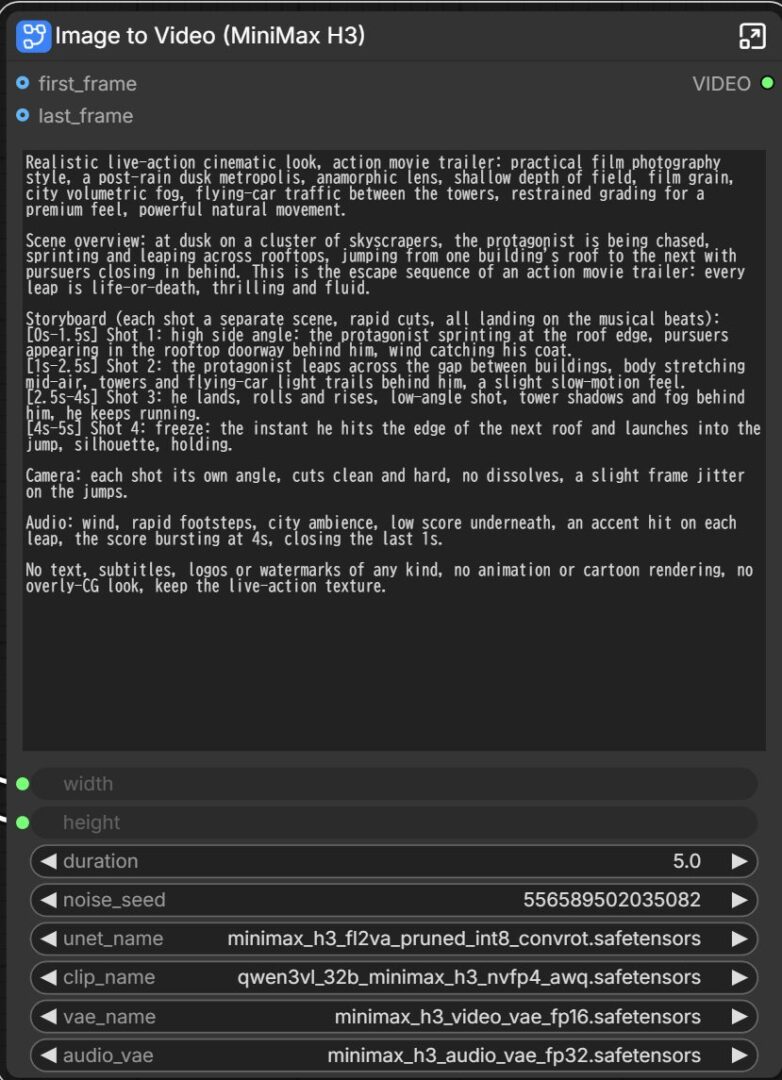
執筆時点だとT2Vのワークフローはサブグラフが「Image to Video (MiniMax H3)」になっています。
ただ処理は問題なさそうなのでこのまま進めます。
ダウンロードしたモデルをセットしてプロンプトを入力するだけです。
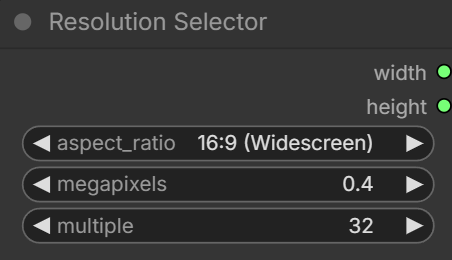
「Resolution Selector」で、動画のアスペクト比と解像度を指定します。
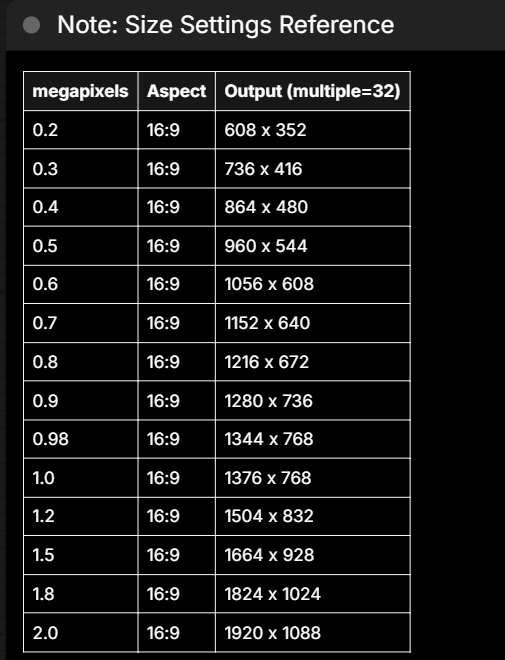
Size Settings Referenceに設定方法があるので、解像度を変更したい場合はこちらを参考にしてみてください。
結果:
生成はVRAM16GBで約6分。
プロンプトがちゃんと反映・再現されています。
umbrella in a neon-lit street at night. Rain falls steadily as she walks from left to right. The camera trucks
right with small amplitude at slow speed, following her movement. Reflections of red and blue signs move across
the wet pavement.
overall_soundscape: Steady rain falls onto the umbrella and pavement. Soft footsteps splash through shallow
puddles while distant cars pass through the street.
non_diegetic_music: Sparse piano notes at a slow tempo with a soft sustained synthesizer underneath.
高速化LoRAを使う場合はturbo modeをtrueにして、LoRAに合わせてstep数や強度を変えてください。
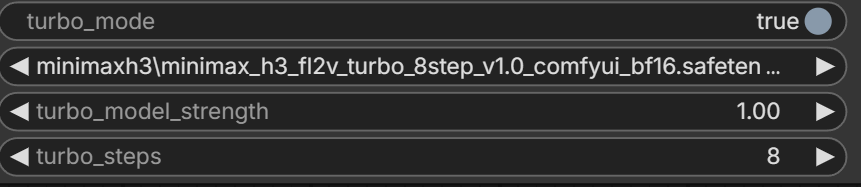
・8step LoRA(2分15秒)
・4step LoRA(1分27秒)
MiniMax H3のI2Vを使う方法
I2Vは、入力画像を最初のフレームとして動かし、音声付き動画を生成する方式です。
「Load Image」を開き、動画にしたい画像をセットします。
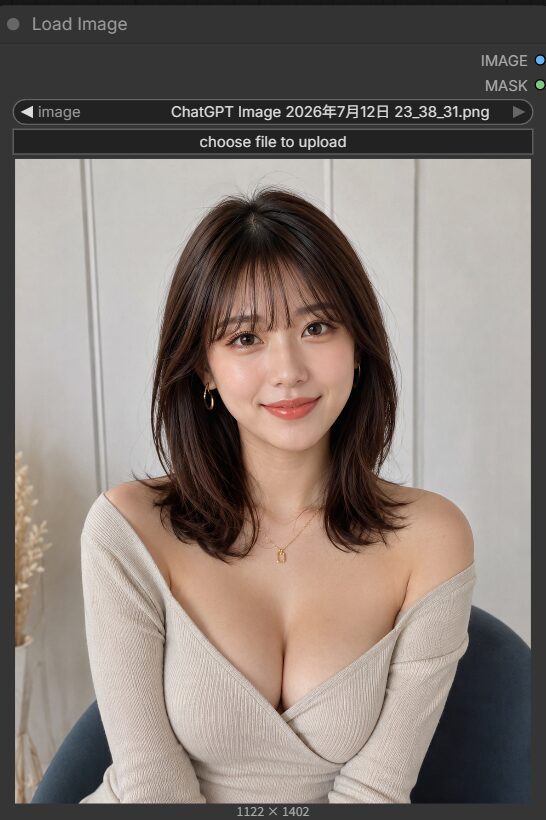
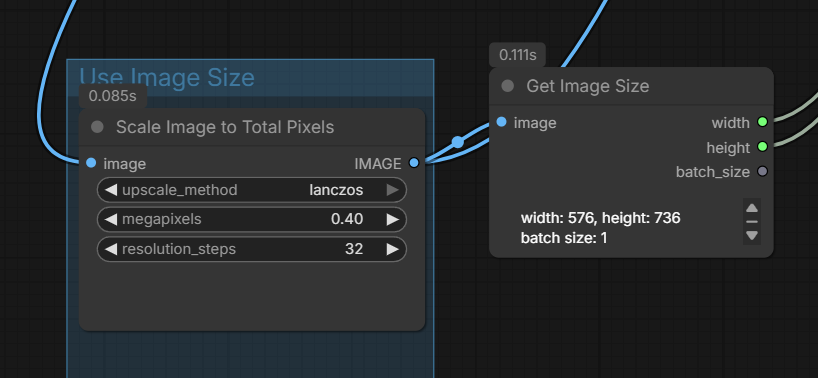
入力画像と生成動画のアスペクト比が同じなら、Resolution Selector経由で大丈夫だと思います。
ただ、アスペクト比が違うとクロップされずに歪んでしまうため、Scale Image to Total Pixels経由にしました。
結果:
生成は約4分39秒でした。
人物も崩れておらず、プロンプトも再現できていると思います。
integrated_multimodal_description:
[Shot 1]
A young woman sits facing the camera in a softly lit room. Preserve her facial features, hairstyle, beige off-
shoulder top, accessories, body proportions, background, and composition from <Picture 1>. She blinks naturally,
slightly tilts her head, and gives a gentle smile. A few strands of hair move subtly as she breathes. The camera
performs a slow, smooth Push In while keeping her face in focus.
overall_soundscape:
Quiet indoor ambience with subtle clothing and hair movement sounds.
non_diegetic_music:
None.
高速化はT2Vと同じです。
turbo modeをtrueにして、LoRAに合わせてstep数や強度を変えてください。

・8step(2分15秒)
・4step(1分25秒)
最後のフレームを指定する
もう1つ「Load Image」ノードを用意して「last_frame」へ接続すれば、「first_frame」と「last_frame」の間を補う形で動画が生成できます。
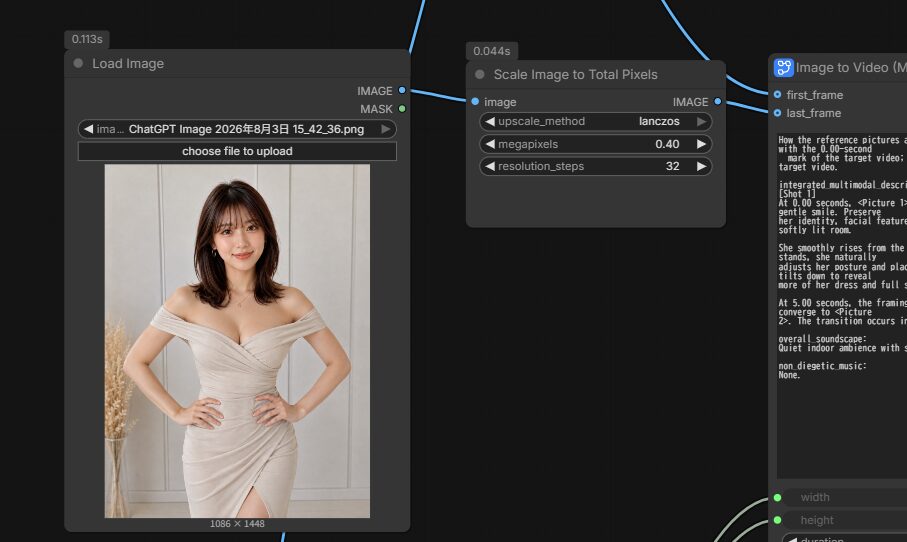
こちらも特に大きな崩れはなく、生成できました。
mark of the target video; Picture 2 (from Shot 1) aligns with the 5.00-second mark of the target video.
integrated_multimodal_description:
[Shot 1]
At 0.00 seconds, <Picture 1> is fully referenced. The woman sits facing the camera with a gentle smile. Preserve
her identity, facial features, hairstyle, beige off-shoulder dress, accessories, and the softly lit room.
She smoothly rises from the chair while maintaining eye contact with the camera. As she stands, she naturally
adjusts her posture and places both hands on her hips. The camera slowly pulls back and tilts down to reveal
more of her dress and full standing pose.
At 5.00 seconds, the framing, posture, hand placement, clothing, and composition smoothly converge to <Picture 2>. The transition occurs in one continuous shot without cuts or sudden changes.
overall_soundscape:
Quiet indoor ambience with subtle clothing movement and soft footsteps.
non_diegetic_music:
None.
MiniMax H3のR2Vを使う方法
R2Vは、参照した画像・動画・音声からキャラクター、画風、動き、カメラワーク、声などを引き継ぐ方式です。
公式テンプレートでは、2枚の参照画像を使う構成になっています。
今回は、被写体に別の画像の服を着させて動画化してみました。
お借りした画像:チェック柄フランネルシャツの赤毛モデル · 無料の写真素材
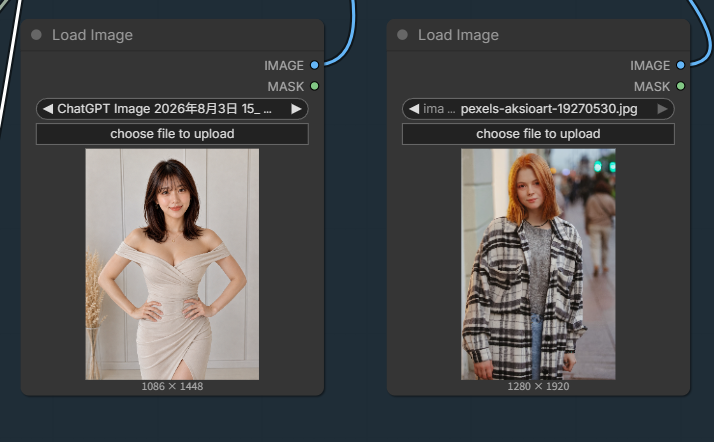
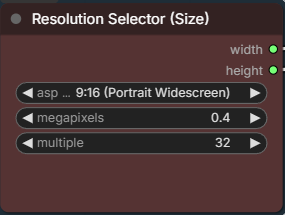
縦長なのでResolution Selector (Size)は9:16にします。
結果:
生成は約7分でした。
服も反映できており、歩く音もわりと自然だと思います。
is the adult woman shown in . is used only as a clothing reference.
summary:
Create a five-second video of wearing the outfit from and performing one graceful turn.
retention_analysis:
: fully_preserved for facial identity, hairstyle, body proportions, accessories, and indoor background.
Do not preserve the beige dress.
: attribute_transfer for the oversized black-and-white plaid coat, gray knitted sweater, and blue jeans
only. Do not copy the referenced woman’s face, hair, body, pose, or background.
detailed_description:
[Shot 1]
stands facing the camera in a full-body shot, wearing the complete outfit transferred from . She takes one small step forward and performs a smooth full-body turn. The plaid coat, sleeves, and hair move
naturally during the turn. She completes the rotation and faces the camera again with a gentle smile. Keep her
facial identity consistent throughout. Use one continuous shot with a subtle camera pullback.
overall_soundscape:
Quiet indoor ambience with subtle footsteps and clothing movement.
non_diegetic_music:
None.
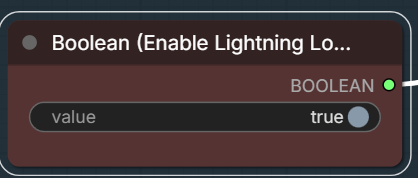
高速化LoRAを使う場合は、Boolean (Enable Lightning LoRA)をtrueにしてください。
・4step(1分44秒)
embeddingの使い方
embeddingは、プロンプトの中にembedding:ファイル名(拡張子なし)と書いて呼び出します。
書く場合は[Shot 1]の直後に入れる必要があるのと、効果と逆の指示を同時に書くと出にくいようです。
バレットタイム(被写体はスローでカメラは動く)なのに、被写体を動かす指示があるなど。
ここらへんは作る動画にもよると思います。
minimaxh3_art_is_explosionだけ試してみました。
integrated_multimodal_description: [Shot 1] embedding:minimaxh3_art_is_explosion Live-action, cinematic, a medium shot frames a white ceramic vase filled with dry pigment powder on a black studio table. The vase bursts outward and the pigment spreads through the air in wide arcs. The camera pulls out with small amplitude at slow speed as the colored dust fills the frame.

overall_soundscape: A sharp burst is followed by fine powder scattering through the air. Loose fragments land on the table with light taps.

non_diegetic_music: Low sustained strings at a slow tempo, cut by a single percussion hit at the burst and thinning out afterwards.
ただこれに関してはembeddingなしでも似たようなものが作れます。
通常のプロンプトで再現できない場合に、embeddingで使えるものがあれば使うみたいな方がいいかもしれません。
integrated_multimodal_description: [Shot 1] Live-action, cinematic, a medium shot frames a white ceramic vase filled with dry pigment powder on a black studio table under a single hard key light. The vase cracks and bursts outward, and the pigment throws off dense plumes of red, blue, and yellow that spread through the air in wide arcs. Fine particles trail behind the plumes and drift across the light, while ceramic shards tumble outward and clatter onto the table. The camera pulls out with small amplitude at slow speed as the colored dust fills the frame.

overall_soundscape: A sharp burst is followed by fine powder scattering through the air. Ceramic shards land on the table with light taps and skid across the surface.

non_diegetic_music: Low sustained strings at a slow tempo, cut by a single percussion hit at the burst and thinning out afterwards.
こちらの記事でembeddingの効果について詳しく書かれています。
VRAMが少ない場合はGGUF版を使う
公式のモデルが重くて動かない場合は、量子化されたGGUF版を使う方法もあります。
GGUF版を読み込むには、カスタムノード「ComfyUI-GGUF」が必要です。
ComfyUI Managerで「ComfyUI-GGUF」を検索してインストール、または直接cloneしてください。
cd ComfyUI\custom_nodes
git clone https://github.com/city96/ComfyUI-GGUF.git
モデルはコミュニティ製のPruned GGUF版を使います。
配布ページでは、VRAM16GBならQ4_K_M、24GBならQ5_K_Mが推奨されています。
以下はQ4_K_Mのファイルです。
| 種類 | ファイル名 | 配置先 |
|---|---|---|
| T2V・I2V用 | MiniMax-H3-FL2VA-Pruned-Q4_K_M.gguf | ComfyUI/models/unet |
| R2V用 | MiniMax-H3-Ref2VA-Pruned-Q4_K_M.gguf | ComfyUI/models/unet |
T2V試した頃と少し環境変えちゃったのでText EncoderとVideo VAEは、int8のものを使っています。
これは個人的に変えたものなので、通常は上記で紹介しているText EncoderやVAEで問題ありません。
公式ワークフローを開いたら、サブグラフの中に入ってLoad Diffusion ModelをUnet Loader (GGUF)に繋ぎ直してください。
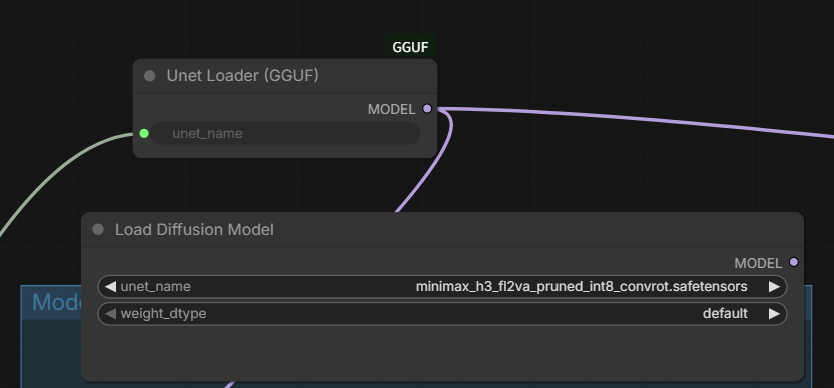
あとはサブグラフ側でGGUFファイルを選択すれば、通常と同じ手順で生成できます。
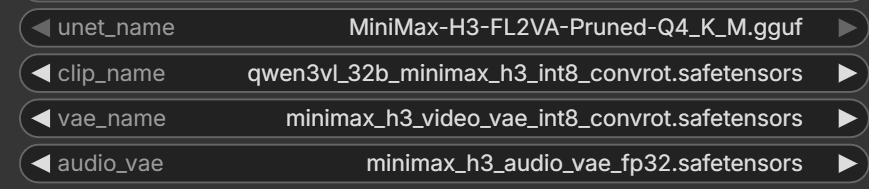
T2Vと同じプロンプトで通常生成が6分48秒でした。
8step(4分11秒)
4step(3分44秒)
AIによるとGGUFをComfyUI(PyTorch)で動かす場合、4bitに縮めた重みを計算のたびに元の精度へ戻してから使っているそうで、その分処理に時間がかかるそうです。
通常モデルが使えるならそちらの方が速いことが多く、GGUFはVRAMが足りず動かない場合に使うのが適切とのこと。
なのでスペックが足りるなら素直にint8などの普通のモデル、足りなくて動かないならGGUFを試すのが良いと思います。
うまく動かないときは
テンプレートやノードが表示されない場合は、ComfyUIのバージョンを確認してください。
MiniMax H3は0.30.0以降、embeddingが効くのは0.34.0以降です。
映像は出るのに音が出ないときは、Audio VAEの配置漏れかもしれません。
VAEは映像用と音声用の2つが必要なので、両方がvaeフォルダに入っているか確認してください。
R2Vだけエラーになる場合は、拡散モデルの取り違えが原因です。
T2VとI2VはFL2VA、R2VはREF2VAと、別々の重みを使います。
まとめ
どの生成方式でもMiniMax H3はプロンプトの追従性・一貫性が高いです。
R2Vで動画を参照する生成だと30分以上かかりそうだったので途中で断念してしまったんですが、高速化LoRAも出たし、処理できないわけじゃないので、モーション取り入れた動画とかも作れると思います。
公開されてからいろいろなLoRAやカスタムノードが出てかなり自由に生成できるようになっているので、興味ある方は使ってみてください。
以上、MiniMax H3の使い方を紹介しました。
参考になれば幸いです。
宣伝:
paperspaceで動かすための環境構築用ファイルをnoteで販売しています。
クラウド上で試してみたいという方は良かったらチェックしてみてください。