MiniMax Music 3が公開され、ComfyUIから最長5分の楽曲をローカルで生成できるようになりました。
歌詞と曲の説明文を渡すだけで、ボーカル入りの曲を1本まるごと作れます。
今回は公式ワークフローを使い、通常版のfp16と低VRAM向けのint8を両方試してみました。
MiniMax Music 3とは?
MiniMax Music 3は、歌詞と曲の説明文から完成した楽曲を生成するMiniMaxの音楽生成モデルです。
イントロからアウトロまで構成を保ったまま、最長5分の曲を1回で生成可能。
8BのGlobal LLMが曲全体の流れを、0.6BのLocal LLMがフレーム単位の細部を担当し、Flow MatchingとFlow-VAEで音声へ戻すとのこと。
入力はCaption(曲の説明)とLyrics(歌詞)の2つだけです。
主な特徴
- 最長5分のフル曲を1回の生成で作れる
- ボーカル・ハーモニー・楽器の構成をCaptionで指定できる
- Lyricsのセクションタグで曲の構成をコントロールできる
- ComfyUIの標準ノードだけでローカル実行できる


MiniMax Music 3のライセンスと商用利用
MiniMax Music 3には、独自の「MiniMax-Music3 Community License」が適用されます。
商用利用そのものは認められていますが、製品やサービスの画面へ「MiniMax-Music3」と表示する条件がありました。
年間売上が2,000万米ドルを超える場合は、MiniMaxからの書面による承認が必要です。
禁止事項をまとめた利用規定(Acceptable Use Policy)もあるため、商用で使う前に最新のライセンスを確認してください。
MiniMax Music 3を動かすために必要なもの
MiniMax Music 3はComfyUI 0.33.1で対応しているため、まだ更新してない場合は更新が必要です。
ComfyUIをまだ導入していない場合は、以下の記事からインストールできます。

モデルをダウンロードして配置する
必要なモデルは4ファイルで、Comfy-OrgのHugging Faceから入手できます。
diffusion modelだけはfp16とint8の2種類があり、int8が低VRAM向けです。
| 種類 | ファイル | 配置先 |
|---|---|---|
| Diffusion Model(通常) | minimax_music3_dit_fp16.safetensors | ComfyUI/models/diffusion_models |
| Diffusion Model(低VRAM) | minimax_music3_dit_int8_convrot.safetensors | ComfyUI/models/diffusion_models |
| Text Encoder | minimax_music3_text_encoder_pruned_int8_convrot.safetensors | ComfyUI/models/text_encoders |
| VAE | minimax_music3_dav.safetensors | ComfyUI/models/vae |
配置後のフォルダ構成は以下の通り。
ComfyUI/
└─ models/
   ├─ diffusion_models/
   │  ├─ minimax_music3_dit_fp16.safetensors
   │  └─ minimax_music3_dit_int8_convrot.safetensors
   ├─ text_encoders/
   │  └─ minimax_music3_text_encoder_pruned_int8_convrot.safetensors
   └─ vae/
      └─ minimax_music3_dav.safetensors
公式ワークフローを読み込む
ComfyUI左上のメニューから「Browse Templates」を開き、Audioカテゴリの「MiniMax Music 3」を選んでください。
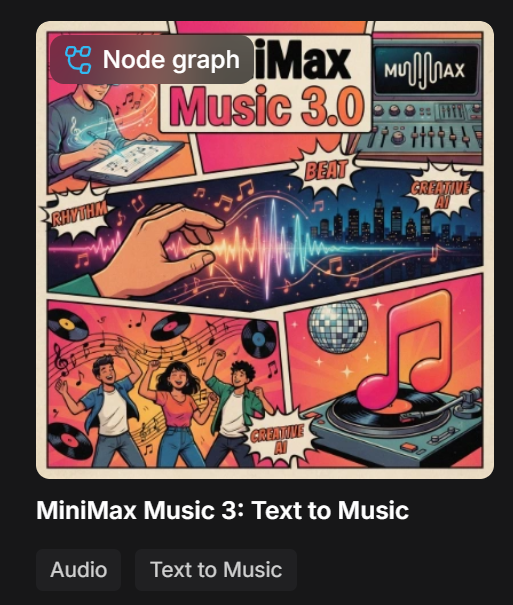
ワークフローはシンプルで、Text to Music (MiniMax Music 3)というサブグラフ1つだけです。
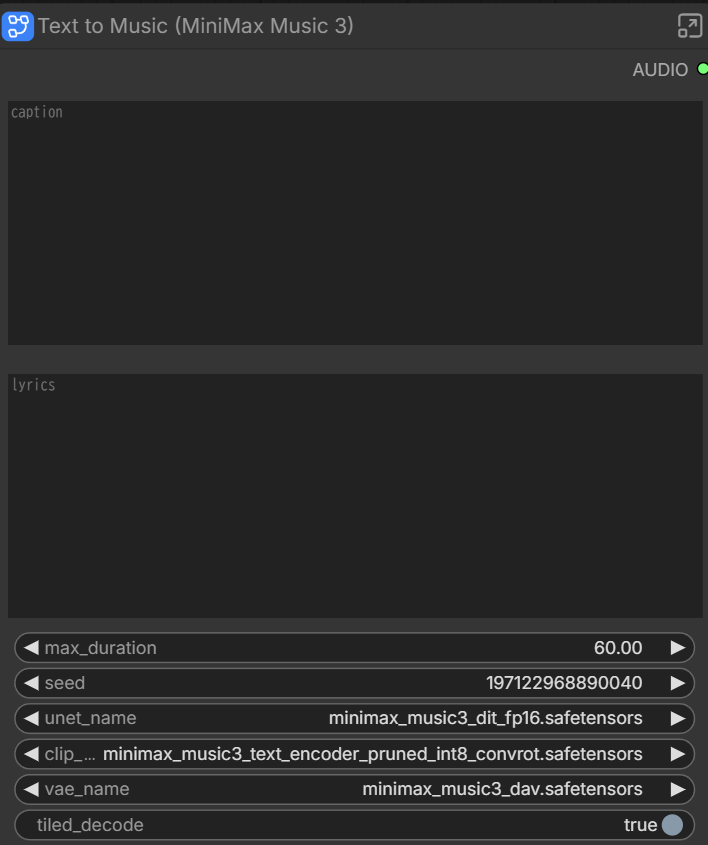
ワークフローにも解説がありますが、各パラメータはそれぞれ以下の通りです。
| 項目 | 内容 |
|---|---|
| max_duration | 曲の長さ(秒)。既定は60秒で、モデル自体は約300秒(5分)まで対応 |
| seed | 同じ値なら同じ曲、変えると別テイクになる |
| tiled_decode | VAEのデコードを分割してVRAMを節約する。低VRAM向け |
| unet_name / clip_name / vae_name | 使用するモデルファイルの指定 |
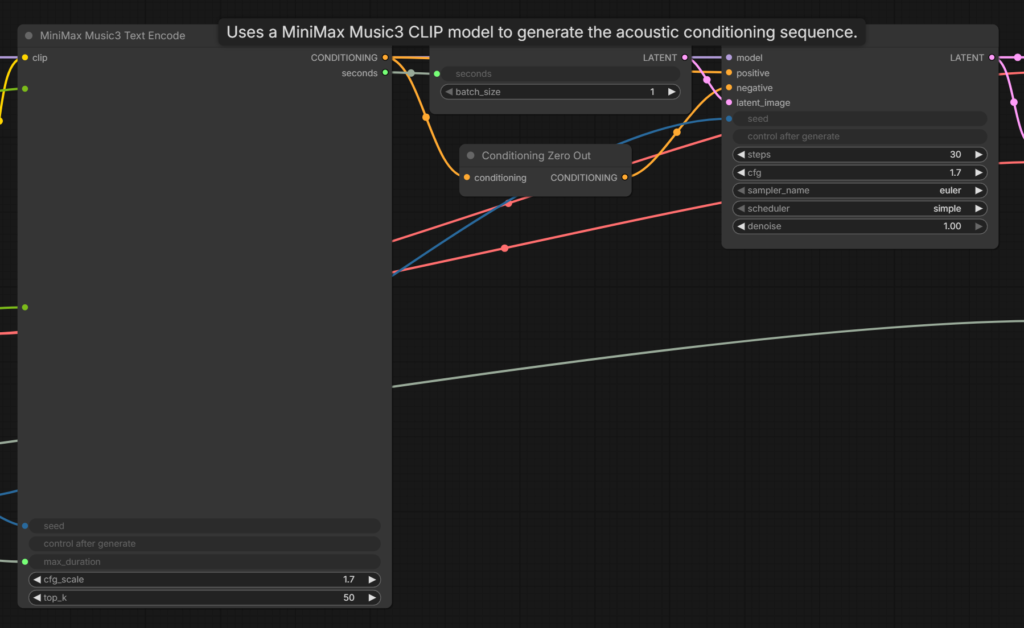
| steps / cfg | サブグラフ内のKSampler。既定は30と1.7 |
| cfg_scale / top_k | テキストエンコード側の設定。既定は1.7と50 |
steps / cfgはサブグラフ内のKSampler、cfg_scale / top_kはMiniMax Music3 Text Encodeで調整できます。
Captionの書き方
Captionは曲の設計図にあたる部分で、公式は3つのブロックに分けて書くことをすすめています。
Global Metadata: ジャンル / BPM / キー / 曲の展開 / 聴くシーン / 音作り
Vocal Details: 声の性別 / 声質 / 歌い方 / ハーモニー / エフェクト
Arrangement: 主役の楽器 / 脇の楽器 / リズム / ベース / セクションごとの構成
skillsのインストール(任意)
公式リポジトリには、短い説明文をこの3ブロック構成へ書き起こす「Music Caption Rewriter」というskillsが用意されています。
CaptionをAIに書いて貰いたい場合はこれを使うと便利です。
WindowsならPowerShellで以下のコマンドでインストールできます。
指定のAIエージェントに入れたい場合は引数つけて実行すればOKです。
codex・claude-codeに入れる例:
npx skills add MiniMax-AI/MiniMax-Music3 --skill music-caption-rewriter -a codex -a claude-code引数つけないでやると対話式でインストールが進められます。
npx skills add MiniMax-AI/MiniMax-Music3 --skill music-caption-rewriter進めて良いか聞かれるので y を入力してEnterを押します。

どのエージェントのskillsに入れるか選んでください。
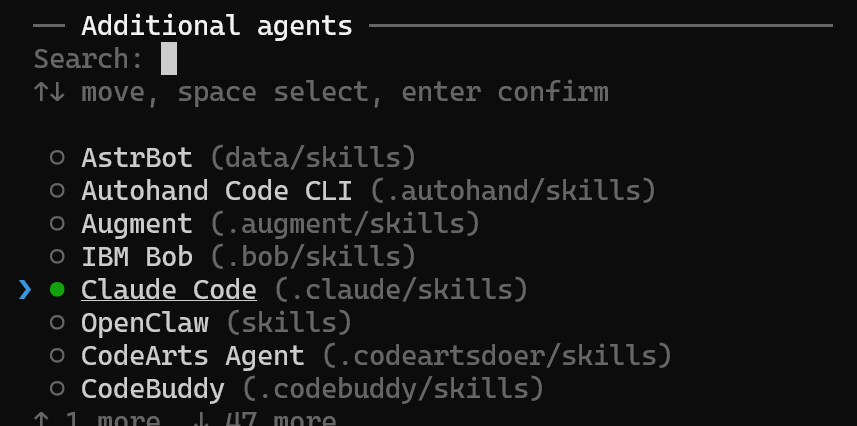
PowerShellを開いているリポジトリで使う場合は、Project、どこからでも呼び出して使いたい場合はGlobalを選択します。

次にインストール方法を聞かれます。
Symlink(Recommended)はskills本体は1か所だけ保存してそこを参照、Copy to all agentsはエージェントごとにskillsをインストールするものなので、基本はSymlink(Recommended)でOKです。

Proceed with installation?→Yesで進めるとインストールが完了します。

あとは使ってるAIエージェントでskillsを呼び出し、作って貰いたい楽曲を入れるだけです。
/music-caption-rewriter
女性ボーカルの爽やかなJ-Pop。
BPMは130前後。
Aメロは控えめで、Bメロから徐々に盛り上がり、サビで一気に開放感を出したい。
ギター、ベース、ドラム、ピアノを中心にして、現代的でクリアなミックス。
ラスサビではコーラスと楽器を厚くして最高潮にする。
MiniMax Music 3にそのまま渡せるStructured Captionにしてください。
Global Metadata
Basic Attributes: BPM is approximately 145. J-Rock / Alternative Rock with melodic anime-rock phrasing. Minor tonality throughout, with brief major-leaning lifts at the top of each chorus.
Global Emotional Progression: The piece opens in fragile, bittersweet stillness — a single clean guitar carrying quiet regret. Tension accumulates steadily through the verses without ever releasing, and the choruses break that restraint into a full-band surge that is loud but still aching rather than triumphant. A stripped bridge returns to vulnerability and doubt, then the final chorus arrives at maximum density and emotional exposure. The outro dissolves back toward the opening fragility, leaving the sorrow unresolved.
Sonics & Production Profile: A wide, modern J-Rock soundstage with hard-panned rhythm guitars in the heavy sections and a bright, cutting upper-midrange that keeps the vocal above the wall of distortion. Low end is tight and punchy. The dynamic contour is deliberately staged: airy and reverberant in the intro, controlled and compressed in the verses, saturated and dense in the choruses.
Vocal Details
Vocal Gender & Timbre: A single female lead. Her timbre is clear and translucent — light, unforced, with a glassy top — and it retains that transparency even at full volume, gaining a faint edge of strain at the peaks rather than turning coarse.
Vocal Style: Verses are restrained and close-miked, with soft breath tone and precise, rhythmic articulation that sits just behind the beat. The pre-chorus opens the throat and adds dynamic push. In the choruses she sings from full chest voice with wide vibrato and audible emotional urgency, sustaining long notes at the phrase ends. The bridge drops to near-whisper intimacy before the final chorus reaches the most exposed, unguarded delivery of the track.
Harmony/Backing Vocals: Self-layered harmonies enter only in the choruses, doubling the lead in thirds and octaves to thicken the hook. The final chorus adds a low-octave double for weight. Verses stay single-tracked to preserve intimacy.
Vocal FX: Moderate plate reverb throughout, with a short delay on selected verse phrases for rhythmic lift. Reverb pulls back noticeably in the bridge to create isolation, then opens again for the finale.
Arrangement
Intro — A clean electric guitar states the main motif alone, arpeggiated with light chorus and delay, ringing in a wide reverb field. A soft synth pad fades in underneath. No drums; the tempo is implied by the picking pattern.
Verse 1 — Bass enters on the root, and the drums come in restrained: tight closed hi-hats, sidestick or light snare, minimal kick. The clean guitar shifts from arpeggios to muted sixteenth-note picking, driving the pulse forward while the vocal stays close and conversational.
Pre-Chorus 1 — A second guitar enters with light overdrive. Toms replace hi-hats, the bass climbs, and a rising synth sweep plus reverse cymbal build the final two bars into a hard cut.
Chorus 1 — Heavily distorted rhythm guitars slam in with open, ringing power chords, hard-panned left and right. The drums switch to a full-force rock groove: aggressive kick pattern, snare cracking on 2 and 4, open hi-hats and frequent crashes. A harmonized lead guitar traces a countermelody above the vocal. The bass moves to driving eighth notes.
Verse 2 — Distortion drops out; the clean guitar motif returns, now with the full drum groove retained beneath it so energy is held rather than reset. A single sustained guitar note rings across the section as a texture.
Pre-Chorus 2 → Chorus 2 — Same build, denser: doubled guitars, added tom fills, and backing vocals entering a bar early. Chorus 2 matches Chorus 1 with an added octave-up lead guitar line.
Bridge — Everything cuts to the clean guitar and a bare synth pad, half-time feel, brushed or rimshot drums. The vocal is at its most fragile. Feedback and a swelling drone build across the last four bars.
Final Chorus — Full band returns at maximum density, no gradual build. Guitars add a harmonized twin-lead line; drums push with double-time hi-hats and continuous crashes. This is the emotional peak.
Outro — Distortion falls away over two bars. The clean intro motif returns alone, delay trails fading, closing on an unresolved ringing chord.
事前に歌詞が決まっている場合は歌詞も入れられます。
/music-caption-rewriter
以下の曲調と歌詞をもとに、MiniMax Music 3用のStructured Captionを作ってください。
曲調:
切ない女性ボーカルのJ-Rock。
BPM 145前後。
イントロはクリーンギター、サビでは歪んだギターと強いドラム。
ボーカルは透明感がありつつ、サビでは感情的に強く歌う。歌詞:
[Verse]
…[Pre-Chorus]
…[Chorus]
…[Bridge]
…制約:
・歌詞そのものは書き換えない
・各セクションの楽器構成と盛り上がり方を明確にする
・MiniMax Music 3のinstructionsにそのまま入れられる形にする
Lyricsとセクションタグ
Lyricsには、歌詞そのものと曲の構成を決めるセクションタグを書きます。
使えるタグは[Intro]、[Verse]、[Pre-Chorus]、[Chorus]、[Bridge]、[Instrumental]、[Outro]など。
公式の説明では、構成を指示しているのはタグの方で、歌詞の文章は雰囲気を伝える役割でした。
間奏を入れたい場所には[Instrumental]だけを置き、歌詞は書かずに空けておきます。
[Intro]
Mmm...

[Verse]
1番の歌詞

[Chorus]
サビの歌詞

[Instrumental]

[Outro]
締めの歌詞
公式のデモページでサンプル曲とCaption・Lyricsをどう書いてるか確認できるので、そちらも参考にしてみてください。


fp16と低VRAM版(int8)の比較
同じ条件で、diffusion modelとtiled_decodeの組み合わせを4通り試してみました。
Caption、Lyrics、seed、max_durationはすべて同じです。
max_duration: 300
seed: 固定
steps: 30 / cfg: 1.7
Caption・Lyrics: 4本とも同じもの
fp16・tiled_decodeオン:526.80 seconds
fp16・tiled_decodeオフ:151.10 seconds
int8(低VRAM)・tiled_decodeオン:152.77 seconds
int8(低VRAM)・tiled_decodeオフ:85.46 seconds
Caption
Global Metadata: Contemporary pop with a light soft-rock and R&B lean. 104 BPM, C major, straightforward major-key writing built around a singable chorus hook. Warm and easygoing at the open, widening into a bright uplifting chorus, pulling back to a calm reflective bridge, then returning one notch brighter for the final chorus and settling into a soft fade. Late-summer evening driving, windows down, streetlights coming on. Clean modern radio production: wide stereo image, punchy but uncrowded low end, airy top, verses left with room to breathe and choruses noticeably fuller and more compressed.
Vocal Details: A single female lead in a comfortable mid register, clear and warm with a slight breathiness on the quiet lines. Verses are close and conversational, phrased just ahead of the beat. The pre-chorus lifts in volume and the chorus opens into a full, sustained delivery that stays controlled rather than belted. Backing vocals are stacked thirds and sixths across every chorus, an added octave double on the final chorus, and soft wordless “oh” pads under the bridge. Light plate reverb and a short slap delay on chorus tails, gentle doubling on the lead in the chorus, no heavy processing.
Arrangement: Intro: clean electric guitar arpeggio with a warm pad underneath and a light shaker, no drums for the first phrase, kick entering on the final bar as a lead-in. Verse: rounded electric bass and a simple kick-snare pattern with closed hi-hats, guitar switching to muted single-note picking, piano only marking the chord changes, everything kept low so the vocal sits forward. Pre-Chorus: hi-hats open, a shaker doubles the eighths, the pad rises and one sustained synth note carries over the downbeat. Chorus: full kit with a crash on the first beat, strummed acoustic guitar layered over the electric, piano block chords, bass moving melodically, harmonies spread wide in the stereo field. Second Verse: back to the verse groove but keeping the acoustic and adding a quiet tambourine, so it reads as a step up rather than a reset. Second Chorus: same shape with an extra harmony layer and a tom fill leading in. Instrumental: an eight-bar guitar lead over the chorus chords answered by piano, drums simplified to a steady groove. Bridge: drums drop to a soft kick and floor-tom pulse, guitar out, piano and pad carrying the harmony under wordless vocals, the last two bars stripping to a single held pad and a rising cymbal swell. Final Chorus: everything returns brighter with octave-doubled vocals, claps and tambourine added, acoustic strumming throughout. Outro: drums thin to hi-hat and kick then stop, leaving the guitar arpeggio, pad and fading vocal ad-libs, ending on one clean sustained chord.
Lyrics
[Intro]
Oh, oh-oh
(here we go)
[Verse]
Six o’clock and the light turns gold
Windows down on the road we know
You keep laughing at something small
I don’t even mind at all
Radio playing a song we lost
Singing loud like it isn’t ours
Everything heavy gets left behind
Somewhere back in the miles
[Pre-Chorus]
And if the summer’s running out
I don’t wanna count it down
[Chorus]
So hold on, hold on to the good part
Every color of the evening in our hands
Hold on, hold on to the good part
We can stay right here until the streetlights end
Oh, oh-oh
Until the streetlights end
[Verse]
Coffee cups and a folded map
Half a plan and we’re fine with that
You say the ocean’s an hour away
I say we’ve got all day
Every red light feels like a friend
Every hour like it won’t end
Take the picture, but leave it blurred
That’s how I want to remember
[Pre-Chorus]
And if the summer’s running out
I don’t wanna count it down
[Chorus]
So hold on, hold on to the good part
Every color of the evening in our hands
Hold on, hold on to the good part
We can stay right here until the streetlights end
Oh, oh-oh
Until the streetlights end
[Instrumental]
[Bridge]
Ooh, when the season turns
And it falls on everything we were
Ooh, I’ll still know the words
To the good part
[Chorus]
So hold on, hold on to the good part
Every color of the evening in our hands
Hold on, hold on to the good part
We can stay right here until the streetlights end
[Outro]
Oh, oh-oh
(hold on, hold on)
Until the streetlights end
Oh, oh-oh
まとめ
プロンプトの影響もあると思いますが、300を指定しても楽曲は3分のものでした。
あと私の環境(RTX4060Ti・VRAM16GB)だとtiled_decodeオフでも問題なく実行できます。
クオリティの差はほぼなく処理時間がかなり変わるので、オフで実行できるならオフの方が良さそうです。
fp16とint8についても正直あまり違いが分かりませんでした。
ローカルの音楽生成モデルだとACE-Stepが有名ですが、個人的にはMiniMax Music 3の方が歌詞や構成が崩れず、楽曲も耳に優しい印象です。
他のジャンル・言語を試してないのでそっちがどうかわかりませんが、今のところSUNOほどじゃないけどかなり良い音楽が生成できるモデルという感じでした。
以上、MiniMax Music 3の使い方を紹介しました。
参考になれば幸いです。