歌詞と音楽スタイルから曲を丸ごと生成できるYuE2が、ComfyUIで使えるようになりました。
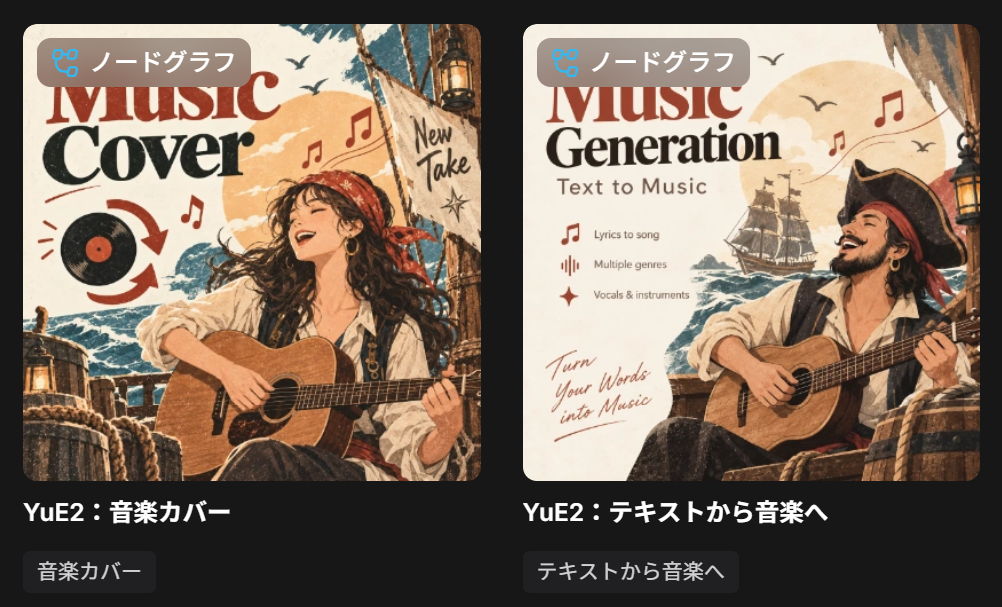
公式テンプレートには、歌詞から曲を作るText to Musicと、元の曲をもとに別アレンジを作るMusic Coverの2つが用意されています。
この記事ではモデルの配置からワークフローの使い方までまとめています。
YuE2とは?
YuE2は、音楽スタイルと歌詞を入力して曲を生成する音楽生成モデルです。
先にメロディとコードをABC記譜の譜面として組み立て、その譜面をもとに48kHzのステレオ音声を作ります。
手持ちの譜面を渡して、その譜面に沿った曲にすることも可能です。
主な特徴
- 音楽スタイルと歌詞から曲を作れる
- メロディとコードを譜面(ABC記譜)として先に計画する
- 用意した譜面を条件にして曲を生成できる
- 48kHzのステレオ音声で出力する
- 出力はパート別ではなく1本のミックス
YuE2のライセンス
ComfyUI向けに再パッケージされたモデルファイル(Comfy-Org/YuE2)は、CC BY-NC 4.0で配布されています。
元のモデルは、m-a-p/YuE2-3Bとm-a-p/SheetSage2です。
非商用のライセンスなので、商用で使う予定がある方は配布ページと元モデルのライセンスを確認してください。

ComfyUIでYuE2を使う方法
ComfyUIのインストール
ComfyUIのインストールがまだの方はこちらの記事を参考にしてみてください。

YuE2のモデルのダウンロードと配置
Text to MusicはYuE2本体だけで動きます。
Music Coverをやる場合はSheetSage2も必要です。
| 種類 | ファイル名 | 配置先 |
|---|---|---|
| YuE2本体 | yue2_3b_int8_convrot.safetensors | ComfyUI/models/checkpoints |
| SheetSage2 | sheetsage2_bf16.safetensors | ComfyUI/models/audio_encoders |
ComfyUI/
└── models/
    ├── audio_encoders/
    │   └── sheetsage2_bf16.safetensors
    └── checkpoints/
└── yue2_3b_int8_convrot.safetensors公式ワークフローの読み込み
ワークフローは、公式のJSONファイルをダウンロードしてComfyUIの画面へドラッグ&ドロップすると読み込めます。
- Text to Music:audio_yue2_text2music.json
- Music Cover:audio_yue2_music_cover.json

もしくはComfyUI左上のメニューの「テンプレートを参照」からワークフローを読み込んでください。
Text to Music:歌詞とスタイルから曲を作る
Text to Musicは、音楽スタイルと歌詞を入力して、ボーカルと伴奏が入った曲を生成するワークフローです。
Styleには「言語・ジャンル・声の特徴・テンポ・楽器・音楽的な特徴」など、どういう曲を作りたいかを書きます。
Lyricsには歌詞と、[Verse]、[Chorus]、[Bridge]、[Outro]などのセクションタグで曲の構成を書きます。
Text to Music (YuE2)の上がStyle、下がLyricsです。
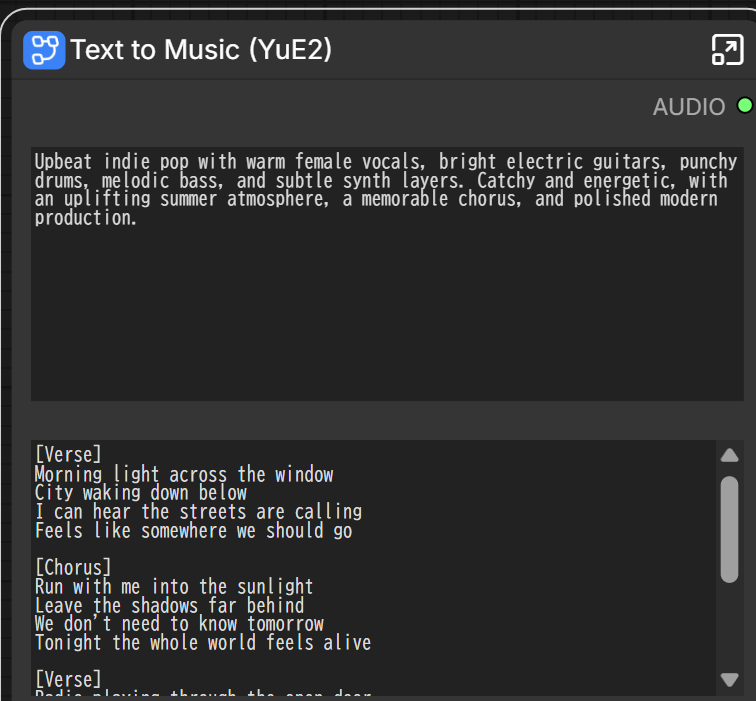
パラメータのABC Planningは「音を生成する前に楽譜を作るか」、Modeは「その楽譜に何を含めるか」です。
| 設定 | 動作 |
|---|---|
| ABC Planning有効・Full | メロディとコードの譜面を作ってから曲を生成。公式ワークフローが通常のText to Music向けに推奨する設定 |
| ABC Planning有効・Melody | メロディだけの譜面を作り、伴奏はより自由に生成 |
| ABC Planning無効 | 譜面の計画を挟まず、StyleとLyricsから直接生成 |
あとはMax Durationで生成する曲の長さの上限を指定し、使用するモデルをセットしてください。

後述するスキルで作って貰ったStyle/Lyricsを入れて、2分58秒で生成できました。
ABC Planning有効・Mode:Full、max_duration:500、RTX4060Ti VRAM16GB/RAM64GB環境です。
・日本語
こっちも同じ条件で生成時間は3分20秒でした。
・英語
Music Cover:元の曲を別アレンジにする
Music Coverは、元の曲のメロディを残したまま、スタイルやボーカル、歌詞、アレンジを変えた別バージョンを作るワークフローです。
Load Audioノードに元の曲を読み込み、新しい音楽スタイルと歌詞を入力して実行してください。
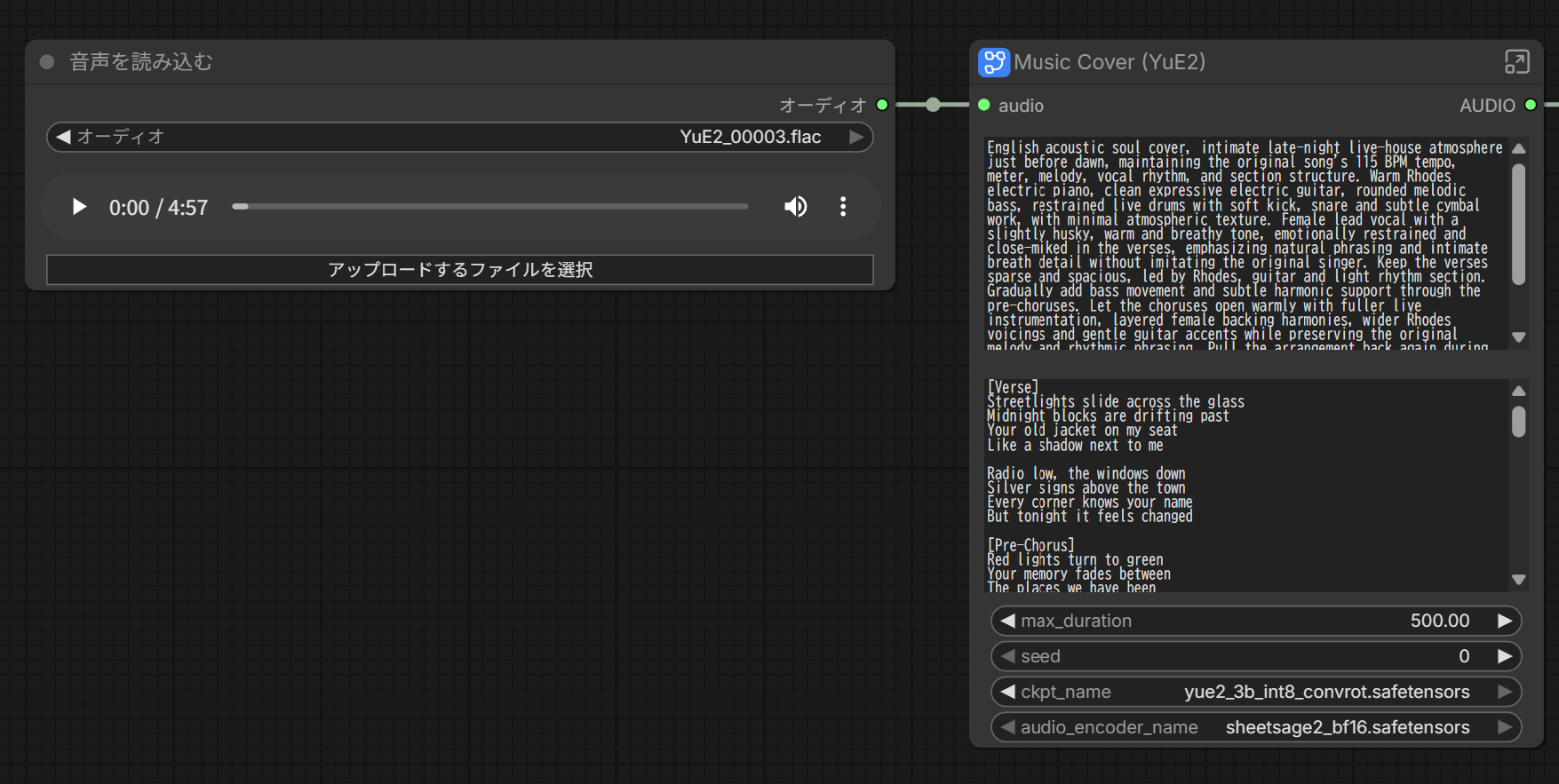
まず曲調の変化を試すなら、元の歌詞を残してStyleだけを変更するのが良いそうです。
歌詞も変えたい場合は、元のフレーズの区切りや音節数に近づけると、元のメロディに合わせやすくなるとのこと。
大きく作り替えたい場合は、StyleとLyricsの両方を変更してください。
Text to Musicの英語の曲を使い、Styleのみアコースティック・ソウル風の指定にしてます。
生成時間は2分56秒でした。
公式スキルを活用する
公式にAIを使って、曲作りや譜面編集を手伝わせるための公式スキル「yue2-music」が用意されています。
ブラウザのAIチャットでやりたい方はGitHubのURL、またはDLしてmd添付して指示を入れれば作れます。
CLIとかデスクトップアプリならURL渡して「スキルをインストールしてください」とか伝えれば、あとはスラッシュなどから呼び出せると思います。
・日本語の曲を作って貰ったときの指示文
• yue2-musicスキルを使って、以下のイメージの曲を企画し、YuE2用のStyleとLyricsを作成してください。

【作りたい曲】
・日本語の女性ボーカルによる、切なくも疾走感のあるロック
・テーマは「別れを経験した主人公が、夜明けの街で新しい一歩を踏み出す」
・Aメロは静かで内省的、Bメロで感情を高め、サビで一気に解放する
・透明感のある歌声に、サビでは力強さと感情を込める
・エレキギター、ベース、生ドラムを中心に、ピアノを控えめに加える
・テンポは150 BPM程度、長さは3〜4分を想定
・サビには覚えやすい印象的なフレーズを入れる

【作成条件】
・Styleは英語で、ジャンル・楽器・声質・テンポ・曲の展開を具体的に記述してください。
・Lyricsはオリジナルの日本語歌詞にし、[Verse]、[Chorus]などのセクションタグを付けてください。
・歌いやすさを考慮し、音節数やフレーズの長さを整えてください。
・歌詞欄には、セクションタグと実際に歌う言葉だけを入れてください。
・StyleとLyricsを、それぞれコピーできる別々のコードブロックで出してください。
・今回はStyleとLyricsの作成までにしてください。音声生成、モデルのダウンロード、環境構築は不要です。Style
Japanese bittersweet driving rock, emotional modern J-rock, clear and transparent female lead vocal with an intimate restrained tone in the verses and a powerful passionate delivery in the choruses, around 150 BPM, energetic live drums, melodic electric bass, layered electric guitars with clean arpeggios in quieter sections and wide distorted guitars in the choruses, subtle piano supporting the harmony without dominating the mix. Quiet and introspective opening verse, gradually rising emotional tension through the pre-chorus, then an explosive uplifting chorus with a memorable singable hook. Second verse adds more rhythmic momentum and guitar movement, followed by a stronger pre-chorus and chorus. Emotional bridge briefly pulls the arrangement back before building into a large final chorus. Bittersweet but ultimately hopeful atmosphere, conveying the feeling of leaving a painful farewell behind and taking the first step forward through a city at dawn.
Lyrics
[Verse]
眠れない街の隅で
君の影を探してた
言えなかった言葉だけ
胸の奥に残ってる
冷たい風に吹かれて
ひとり歩く交差点
戻れないと知りながら
何度も振り返ってた
[Pre-Chorus]
消えない痛みも
抱えたままでいい
遠い空の向こう
光が差してく
[Chorus]
夜明けを越えて 走り出せ
涙の跡も連れてゆけ
さよならの先にある空へ
もう一度 僕は歩き出す
夜明けを越えて 手を伸ばせ
昨日の僕を置いてゆけ
君を忘れるためじゃなくて
新しい朝を迎えるため
[Verse]
始発を待つホームには
少しずつ人が増えて
止まっていたこの世界も
静かに動き始める
君と見てた景色さえ
いつか優しくなるかな
答えなんてまだなくても
足だけは前を向いた
[Pre-Chorus]
こぼれた願いを
拾い集めながら
白む空の下で
僕は息をする
[Chorus]
夜明けを越えて 走り出せ
震える声も連れてゆけ
さよならの先にある空へ
もう一度 僕は歩き出す
夜明けを越えて 手を伸ばせ
昨日の僕を置いてゆけ
君を忘れるためじゃなくて
新しい朝を迎えるため
[Bridge]
もしもいつの日か
君を思い出して
少しだけ笑えたなら
それでいい
失くしたものより
これから出会うものを
信じてみたいんだ
この朝から
[Chorus]
夜明けを越えて 走り出せ
涙の跡も連れてゆけ
さよならの先にある空へ
何度でも 僕は歩き出す
夜明けを越えて 手を伸ばせ
昨日の僕を置いてゆけ
君と過ごした日々を抱いて
新しい朝を迎えにゆこう
夜明けを越えて 走り出せ
光の中へ 走り出せ
・英語の曲を作って貰ったときの指示文
yue2-musicスキルを使って、以下のイメージの曲を企画し、YuE2用のStyleとLyricsを作成してください。

【作りたい曲】
・英語の女性ボーカルによる、ノスタルジックで踊れるシンセポップ
・テーマは「終わった恋の思い出を胸に、夜の街を抜けて自分の未来へ向かう」
・Aメロは親密で少し寂しく、サビで視界が開けるような高揚感を出す
・息遣いの感じられる柔らかな歌声に、サビでは伸びやかなハーモニーを重ねる
・温かいアナログシンセ、リズミカルなシンセベース、軽快なドラム、きらめくギターを使う
・テンポは115 BPM程度、長さは3〜4分を想定
・サビには、短くて口ずさみやすい英語のフックを入れる
・切なさを残しながらも、最後には前向きな余韻を感じさせる

【作成条件】
・Styleは英語で、ジャンル・楽器・声質・テンポ・曲の展開を具体的に記述してください。
・Lyricsは自然な英語のオリジナル歌詞にし、[Verse]、[Chorus]、[Bridge]などのセクションタグを付けてください。
・英語の自然な強勢、音節数、息継ぎを考慮し、歌いやすく整えてください。
・韻は適度に使い、韻を踏むために不自然な表現にしないでください。
・感情を説明するだけでなく、街の光や車窓などの具体的な情景で表現してください。
・歌詞欄には、セクションタグと実際に歌う言葉だけを入れてください。
・StyleとLyricsを、それぞれコピーできる別々のコードブロックで出してください。
・今回はStyleとLyricsの作成までにしてください。音声生成、モデルのダウンロード、環境構築は不要です。Style
English nostalgic synthpop with a bittersweet but uplifting nighttime atmosphere, female lead vocal, around 115 BPM. Warm analog synthesizers, pulsing rhythmic synth bass, crisp light acoustic-electronic hybrid drums, shimmering clean electric guitar, subtle atmospheric pads and bright arpeggiated synth textures. Soft, intimate and breathy female vocals in the verses, close and emotionally restrained, gradually opening through the pre-choruses into clear, soaring vocals in the choruses with wide layered harmonies. Danceable steady groove with an understated verse, rising harmonic and rhythmic tension in the pre-chorus, then a spacious euphoric chorus that feels like city lights opening into the horizon. Second verse adds brighter synth movement and guitar accents. Bridge briefly strips back the drums and bass for a reflective moment before rebuilding into a larger final chorus with richer harmonies and an optimistic emotional release. Nostalgic, cinematic and nocturnal, ending with a lingering sense of moving forward.
Lyrics
[Verse]
Streetlights slide across the glass
Midnight blocks are drifting past
Your old jacket on my seat
Like a shadow next to me
Radio low, the windows down
Silver signs above the town
Every corner knows your name
But tonight it feels changed
[Pre-Chorus]
Red lights turn to green
Your memory fades between
The places we have been
And somewhere I have never seen
[Chorus]
Drive into the light
Drive into the light
Leave the old streets far behind
I can carry you
Without holding on to you
Drive into the light
[Verse]
Neon trembles in the rain
Headlights running down the lane
In the window, for a while
I can almost see your smile
Then the skyline starts to glow
Morning coming soft and slow
What we had was real enough
I don’t have to give it up
[Pre-Chorus]
Red lights turn to green
A new sky opens over me
The night is growing thin
And I can feel the road begin
[Chorus]
Drive into the light
Drive into the light
Leave the old streets far behind
I can carry you
Without holding on to you
Drive into the light
[Bridge]
One last song beneath the signs
One last look at another time
I won’t erase what we became
I just won’t stay here the same
The rearview fills with fading gold
The morning air is turning warm
I breathe it in and let it go
There’s somewhere else I want to know
[Chorus]
Drive into the light
Drive into the light
Leave the old streets far behind
I can carry you
Without holding on to you
Drive into the light
Drive into the light
Drive into the light
There’s a new day in my eyes
I can miss you still
And keep moving forward still
Drive into the light
・カバー用のStyleを考えて貰ったときの指示文
yue2-musicスキルを使って、先ほど作成した英語のシンセポップ曲をカバーするためのStyleとLyricsを用意してください。

【カバーの方向性】
・女性ボーカルのアコースティック・ソウル
・原曲の夜の街の雰囲気を、夜明け前の小さなライブハウスで歌うような親密な雰囲気へ変える
・温かいローズピアノ、クリーンギター、丸みのあるベース、控えめな生ドラムを中心にする
・ボーカルは少しハスキーで、抑えた感情と自然な息遣いを大切にする
・Aメロは音数を絞り、サビでコーラスと楽器を重ねて温かく広げる
・原曲の切なさと前向きな余韻を残す

【維持するもの】
・英語歌詞は変更せず、前の会話で作成した歌詞をそのまま使用する
・元曲の主旋律、リズム、セクション構成を維持する
・テンポと拍子も原曲を維持し、伴奏・音色・歌唱表現を中心に変更する
・元の歌手と同じ声を再現する指定はしない

【出力】
1. カバー用のStyleを英語のコードブロックで出す
2. 元のLyricsを別のコードブロックで出す
3. YuE2でカバーとして使うための入力と設定を短く説明する

【カバーとしての扱い】
・元曲のメロディーを保持するには、元曲から得たコード記号なしのABC楽譜を使い、cot="melody"で生成する前提にする
・StyleとLyricsだけでは元曲のメロディーを保持できないことを明確にする
・元音源やABC楽譜が未提供でも、今回はカバー用Styleの作成まで進める
・前の会話に実際の歌詞がない場合は、歌詞を新しく作らず「元の英語歌詞をここに使用」と記載する

今回は文章の作成だけにしてください。音声生成、音源の採譜、モデルのダウンロード、環境構築は不要です。Style
English acoustic soul cover, intimate late-night live-house atmosphere just before dawn, maintaining the original song’s 115 BPM tempo, meter, melody, vocal rhythm, and section structure. Warm Rhodes electric piano, clean expressive electric guitar, rounded melodic bass, restrained live drums with soft kick, snare and subtle cymbal work, with minimal atmospheric texture. Female lead vocal with a slightly husky, warm and breathy tone, emotionally restrained and close-miked in the verses, emphasizing natural phrasing and intimate breath detail without imitating the original singer. Keep the verses sparse and spacious, led by Rhodes, guitar and light rhythm section. Gradually add bass movement and subtle harmonic support through the pre-choruses. Let the choruses open warmly with fuller live instrumentation, layered female backing harmonies, wider Rhodes voicings and gentle guitar accents while preserving the original melody and rhythmic phrasing. Pull the arrangement back again during the bridge for a reflective live-room feeling, then build naturally into the final chorus. Bittersweet, soulful and understated, preserving the original sense of loss while ending with warmth, acceptance and forward motion.
カバーや譜面の再利用については、生成・カバーのリファレンスに詳しい説明があります。
まとめ
少し前にMiniMax Music 3がreleaseされましたが、個人的にはYuE2の方がクオリティは高いように感じました。
日本語はちょっと発音が怪しい部分もあるんですが、音質・バランスもいいし、長い曲もちゃんと作れます。
生成も速いです。
カバーもStyle変えるだけでできるし、オリジナル曲を作ってみたい方は、ぜひ使ってみてください。
以上YuE2の使い方を紹介しました。
参考になれば幸いです。